Repost from 10-11-2025
Tosh is out for D&D at Ray’s house, so I decided I would practice my dictation while he’s gone. I find it inhibiting when there’s someone in the apartment and I’m dictating anything.
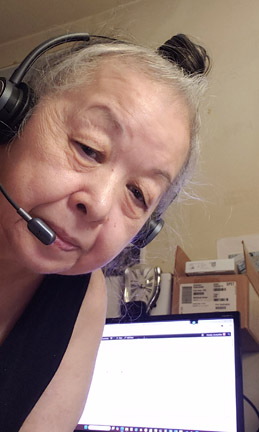
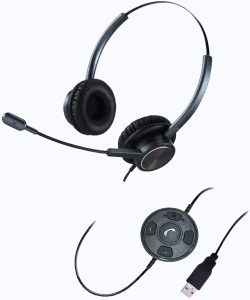
I want to talk about some of the tools that I use for writing. At the moment I’m using dictation software: Dragon 16. In order to use any dictation software, one needs a decent microphone. Here’s the inexpensive microphone that I have right now, “USB Headset with Noise Cancelling Microphone, Binaural PC Headset with Call Reminding and Busy Light Indicator for Home Office Business Softphone Skype, Pro Mic for Voice Recognition Dictation”
When I started using Dragon for dictation it was the only software on the market and was a bit expensive. Years have gone by and now there are free online options for dictation. I haven’t tried these free online options because I paid a lot of money to be on the ground floor of using Dragon, and with that investment I have no motivation to try any other software.
When I first got Dragon, it didn’t have the transcription capability. I was held hostage to my computer indoors. One day I got a phone call from Dragon customer service, a nice lady named Mary, and she asked me if I was happy with my version of Dragon. I told her I was happy, but I was inhibited to use it because I share my computer space with a common cause way and I had three other people living with me. It was very difficult to dictate with people walking back and forth from the kitchen to the bathroom and then back to their room.
Mary said she had an offer she liked to make me. She asked if I would like an upgrade to the version of Dragon that would be able to transcribe wav files, and she would offer me a digital voice recorder too. All this could be had for less than the cost of the upgraded version of Dragon.
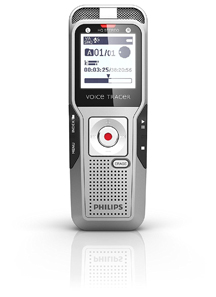
I turned into that meme of “shut up and take my money!” I accepted her offer and she suggested that I get the CD of the Dragon upgrade so I would have a physical copy on hand. The digital voice recorder was a Phillips dvt3200, model that I realize later was about to be discontinued, but I didn’t care. I just wanted to be Agent Dale Cooper from Twin Peaks dictating memos while wandering around outside without being tethered to my computer.

The digital voice recorder saves the files in wav format. After I dictate into the DVR I then plug it into my computer, turn on the Dragon software, then search for the wav files I want transcribed. I tested it out and it worked. I was a happy gal.
As with all technology there is additional bits and bobs to go with a new toy. I invested in the lapel mic, “PoP voice Professional Lavalier Lapel Microphone Omnidirectional Condenser Mic” and then a wind reduction fuzzy cap to go over the mic to cut down the sound of wind. During the CoVid pandemic I tried clipping the lapel mic to the inside of my N 95 facemask to see if I could dictate to my digital voice recorder wall protecting myself from CoVid virus. It didn’t work.
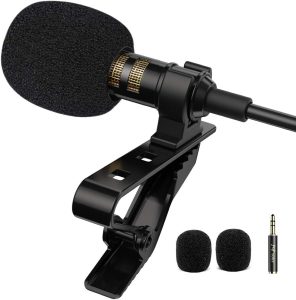
One might think it bit extravagant to get an expensive dictation software package, headset earphones with a mic that makes you look like you’re a journalist in a helicopter, lapel mic, and the other bits and bobs. But bear me out.
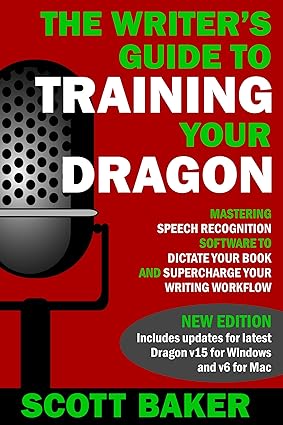
The first I heard about dictation software was from an author who had injured his back and couldn’t sit up at his desk to type. His only source of income for his family was from his writing. So, it was a scary time for him. He found out about dictation software that would not only help him with his writing but also help him verbally move around his computer screen. He could open new tabs, search for URLs, click links, create new documents, and just about anything that you can think of that you would be doing with your hands on the keyboard. Here he is Scott Baker (Author) “The Writer’s Guide to Training Your Dragon: Using Speech Recognition Software to Dictate Your Book and Supercharge Your Writing Workflow (Dictation Mastery for PC and Mac) Kindle Edition”
Now that I’m getting old and arthritis has caught up with my finger joints, I find the dictation software a blessing. Back in the day when I was a secretary and administrative assistant, I could type like the wind. I had practiced on typing software on my old computer, the kind where you had to boss your DOS, and I would run typing races with the software. Like being a competitive typist. So, you know I was serious about keeping my word per minute score high. With my hands beginning to hurt, and after my carpal tunnel surgery, the thought of dictation software haunted me.
There are some downsides. For example, certain verbal commands are also common phrases in real life. My boss lady at a computer company was having carpal tunnel problems with her wrists and needed to use dictation software. She had a whole bunch of tabs open at her computer when working at home. She had asked her daughter, and I will type this out, to “close the window” because it was a bit breezy. As soon as she said that all of her tabs closed on her computer monitor. A little First World Yikes moment. During this dictation session there were three moments where what I wanted to write through dictation was also a Dragon command. During times like that I will use “work around phrases” and then go back during the edit to put in what I really wanted to say. But that’s a minor inconvenience all in all. If you don’t have arthritis you could knit, crochet, sculpt clay, pet your cat, or any number of busy finger activities while you dictate to your computer.
So this is the first blog post about some of the tools that I use for writing. If you don’t have big bucks to invest in buying Dragon, which is a bit pricey, then just search online for “free dictation software” for the particular operating system you use. I read that some of the free dictation software available are getting good because of the advent of AI. But you have to check that out for yourself. My next blog post about writing tools will be about using Scrivener. Okay, that’s about it for today.